-
最新公告
- 春節(jié)放假通知 2026-02-12
- 異常流量清洗服務(wù)正式上線! 2026-01-23
- 【ICP 備案】關(guān)于公安聯(lián)網(wǎng)備案流程升級的公告 2026-01-20
- 虛擬主機(jī)空間全新擴(kuò)容升級公告 2025-12-11
- 充值預(yù)付款
- 幫助中心
- 提交工單
- 備案
- 身份識別碼:
- 消息中心()



























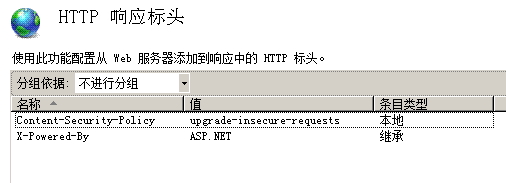
部署https后瀏覽器提示不安全,不出現(xiàn)綠色小鎖?網(wǎng)站部署https后,瀏覽器提示不安全, 不出現(xiàn)綠色小鎖圖標(biāo)? 訪問網(wǎng)站后,按f12,瀏覽器提示: Mixed Content: The page at 'https://www.xxx.com/'' was loaded over HTTPS, but requested an insecure image 'http://www.xxx.com/uploads/2018/12/3.png'. This content 原因是在https頁面中,如果調(diào)用了http資源,那么瀏覽器就會拋出一些錯誤, 解決辦法:在header中加入 Upgrade-Insecure-Requests,會告訴瀏覽器可以把所屬本站的所有 http 連接升級為 https 連接,外站請求保持默認(rèn); 添加header方法: 1.iis7 或直接在網(wǎng)站根目錄web.config中定義 <?xml version="1.0" encoding="UTF-8"?> <configuration> <system.webServer> <httpProtocol> <customHeaders> <add name="Content-Security-Policy" value="upgrade-insecure-requests" /> </customHeaders> </httpProtocol> </system.webServer> </configuration> 2.apache 可直接在網(wǎng)站根目錄.htaccess中定義 <IFModule mod_headers.c> Header add Content-Security-Policy upgrade-insecure-requests </IFModule> 3. nginx server {
listen 80;
server_name (myservername);
add_header Content-Security-Policy "upgrade-insecure-requests";
location / {
proxy_pass http://localhost:5000;
}
}
|
|||||
| >> 相關(guān)文章 | |||||
|
|
|||||

- 公司概況 公司文化 榮譽(yù)資質(zhì) 最新公告
- 域名注冊 刺猬建站 定制建站 企業(yè)郵箱 虛擬主機(jī) SSL證書
- 企業(yè)上網(wǎng)解決方案 企業(yè)溝通解決方案 企業(yè)云辦公解決方案 網(wǎng)絡(luò)安全解決方案 數(shù)字化解決方案 外貿(mào)營銷解決方案
- 購物流程 充值預(yù)付款 幫助中心 提交工單 聯(lián)系客服
- 虛擬主機(jī)控制面板 35備案系統(tǒng)
-
業(yè)務(wù)咨詢熱線:
400-135-3511
售后服務(wù)電話:
021-63305889
域名濫用投訴:
domainabuse@35.cn

 關(guān)注我們



 咨詢
咨詢
 售后
售后
 電話
電話
 工單
工單